



大憨批之mcdoc进阶
摘要:Mcdoc是一种描述数据格式的语言。本文详细介绍了如何在Spyglass(大憨批)中创建mcdoc文件来为自定义的storage或物品数据提供错误检查,语法高亮,和快速补全。
一年半前作者写过Spyglass进阶使用说明,里面介绍了部分mcdoc的用法。本文中将更加详细地介绍mcdoc。
什么是mcdoc?
mcdoc是一种描述了Minecraft原版数据包与资源包中,JSON和SNBT的数据结构的规范文件。
比如mcdoc记载了僵尸有个NBT叫做
DrownedConversionTime,类型是int
物品修饰器
set_lore有一个参数叫
entity,是个字符串而且必须是特定的内容之一。
包含了原版数据结构的mcdoc文件合集被Spyglass的团队维护于SpyglassMC/vanilla-mcdoc。Spyglass(也叫大憨批,DHP)会在运行时读取这些内容以在你写JSON或者SNBT时提供相应的补全:
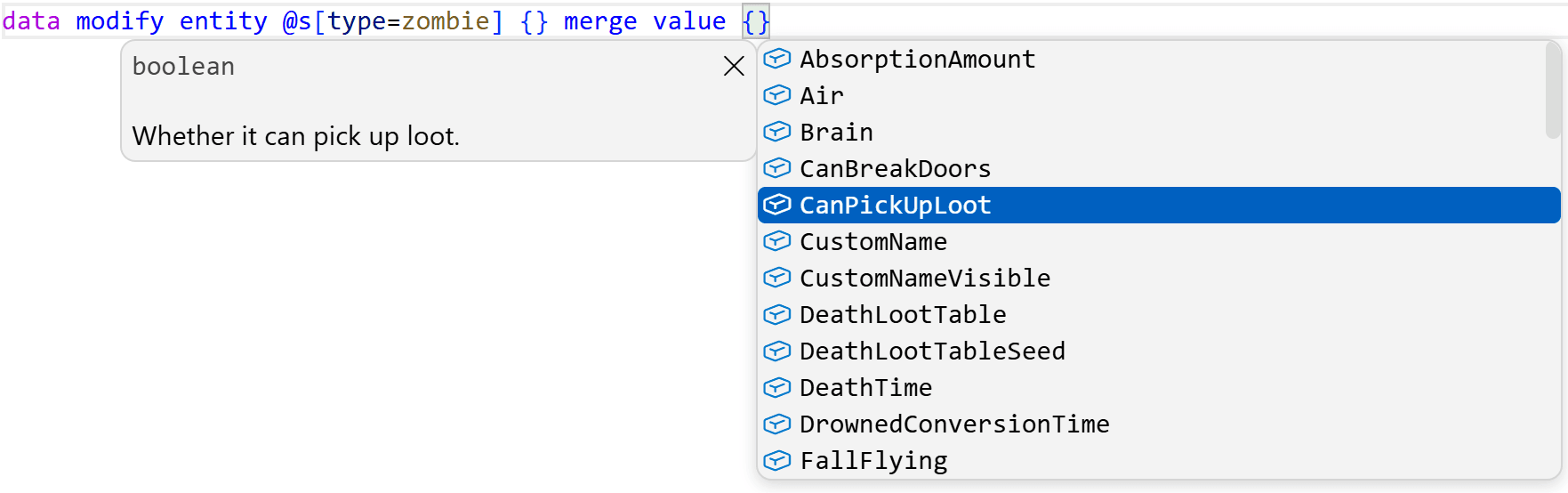
比如此处,mcdoc告诉了大憨批僵尸有哪些NBT标签。如果用户输入了一个不存在的键名,或者用错了数据类型,就会给出诊断信息。
然而很多人不清楚的是,大憨批允许用户创建自己的mcdoc文件,从而为完全自定义的数据结构提供诊断和补全,例如写在storage和custom_data中的那些。
这是一个非常强大的功能。当你需要处理复杂的数据结构时,mcdoc可以省去一切记住各个键名的担忧,让你在写data modify storage时获得和data modify entity一样的体验。
此外,在设计新系统之前先使用mcdoc设计它使用的数据格式,非常有助于你有计划地,优雅地,思考并设计新的系统。
创建mcdoc
TIP
我们建议读者新建一个空数据包,一边阅读一边一起尝试。
大憨批现在已经内置了mcdoc语言的高亮等功能,只要安装了大憨批就可以直接开始。
你需要在根目录创建一个mcdoc文件夹。所有的.mcdoc文件都应该放在这个文件夹中。
同时,建议下载一份vanilla-mcdoc,也就是原版的数据结构。mcdoc允许调用其他文件,包括内置的原版mcdoc文件中的数据结构。
在mcdoc目录中创建一个example.mcdoc文件,我们可以开始了。
基本类型
TIP
虽然本文很长,但大部分内容都是进阶格式,实际上很多时候只会用到本文的基础部分。
在mcdoc中,有以下几种基本类型,对应了NBT和JSON中的几种基本类型:
boolean, byte, short, int, long, float, double, 和string。
想要定义复合标签(或者叫字典)时,使用struct关键字。需要给出这个复合标签的名字,以及它包含的键值对。每个键值对用逗号隔开。
比如,定义一个空的复合标签:
struct EmptyObj{
}
定义一个包含了各个基础类型的复合标签:
struct Primitives{
    myBool: boolean,
    myByte: byte,
    myShort: short,
    myInt: int,
    myLong: long,
    myFloat: float,
    myDouble: double,
    myString: string,
}为了让读者能获得及时的反馈,让我们先来看看mcdoc中的dispatcher(可以叫调度器)。
暂时可以不深入了解它是个什么东西,之后的章节我们会深入探索。
minecraft:storage这个调度器可以用来规定storage的数据结构。调度器的键名就是storage的命名空间ID。
比如,我们要求tut:example这个storage中包含的数据类型必须符合上面的Primitives:
dispatch minecraft:storage["tut:example"] to Primitives

struct Primitives{
    myBool: boolean,
    myByte: byte,
    myShort: short,
    myInt: int,
    myLong: long,
    myFloat: float,
    myDouble: double,
    myString: string,
}好,保存文件,打开一个函数,写一下data merge storage tut:example {},可以发现大憨批已经在根据我们规定的内容提供补全了。
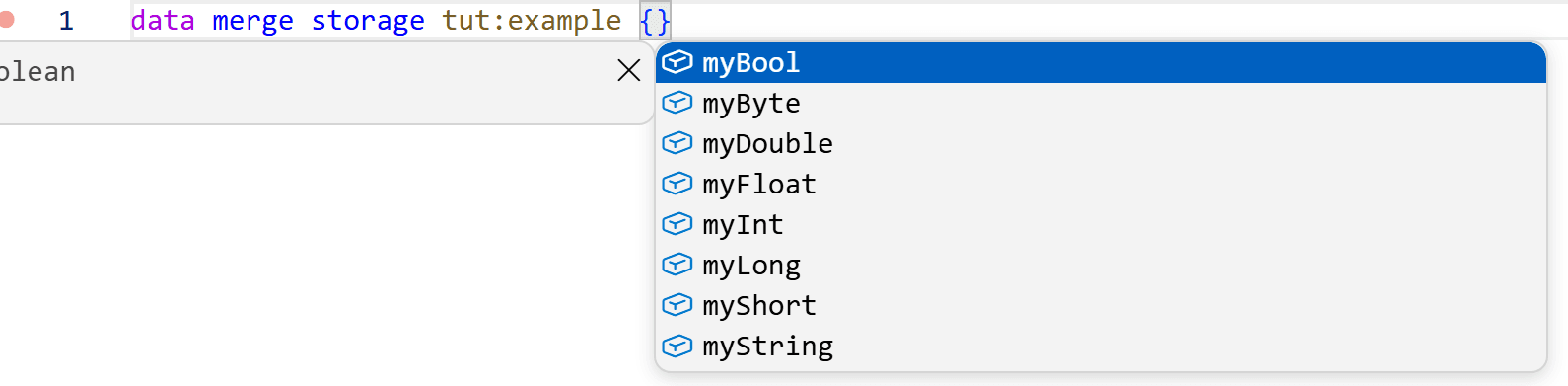 接下来开始介绍mcdoc的语法,让我们从基本类型开始。
复合标签
我们可以嵌套复合标签:
dispatch minecraft:storage["tut:example"] to Primitives

struct Primitives{
    myInt: int,
    myString: string,
    data: Inner,
}

struct Inner{
    value: double
}这个对应了{myInt: 0, myString: "", data: {value: 0.0d}}。
struct可以内联直接写在里面:
dispatch minecraft:storage["tut:example"] to struct Primitives{
    myInt: int,
    myString: string,
    data: struct Inner{
        value: double
    },
}
可以递归调用自己:
dispatch minecraft:storage["tut:example"] to struct Primitives{
    myInt: int,
    myString: string,
    data: struct Inner{
        value: Primitives
    },
}
也可以匿名:
dispatch minecraft:storage["tut:example"] to struct{
    myInt: int,
    myString: string,
    data: struct{
        value: double
    },
}除了将一个struct当成一个键名的值,也可以用...在另一个struct中直接使用另一个struct中的键值对:
dispatch minecraft:storage["tut:example"] to struct{
   a: int,
   b: int,
   ...More,
}

struct More{
    c: int,
    d: int,
}这对应了一个{a:0, b:0, c:0, d:0}的结构。
当然,这个也可以直接写在里面,也可以匿名:
dispatch minecraft:storage["tut:example"] to struct{
   a: int,
   b: int,
   ...struct{
        c: int,
        d: int,
    },
}
列表
在任意数据类型的名称外加上方括号[]表示这是一个列表。
比如,以下是各式各样的列表:
dispatch minecraft:storage["tut:example"] to struct{
    intList: [int],
    strList: [string],
    objList: [myStruct],
    objList2: [struct{
        value: double
    }]
}

struct myStruct{
    data: int
}
数组
SNBT中有和列表不同的byte, int, 和long的数组,分别用byte[], int[], long[]标识。注意它们和[byte], [int], [long]是不同的。
dispatch minecraft:storage["tut:example"] to struct{
    byte_array: byte[],
    int_array: int[],
    long_array: long[],
}
任意
any可以用来表示任何类型:
dispatch minecraft:storage["tut:example"] to struct{
    payload: any,
    payload2: [any],
}
可选
可以在键名和冒号之间加一个问号?来表示这个键是可选项,否则就是必选的:
dispatch minecraft:storage["tut:example"] to struct{
    myString: string,
    myIntOptional?: int,
    dataOptional?: struct{
        value: double,
        flagOptional?: boolean,
    },
}
如果必选项不存在,大憨批会报错。
特殊键名
在mcdoc中,键名的标准十分严格,比如必须使用字母,开头不能有下划线,不能使用关键字,不能使用.等等。
如果需要使用这些特殊键名,需要使用引号包围,类似
struct Example{
    "any": any,
    "string": string,
    "__illegal": any,
    "整点薯条": any,
}
数值范围
所有的数值类型,字符串和列表都可以在后面加一个@ <value>或@ <min>..<max>来限制值的范围。
数字是限制大小,字符串是限制字符数量,列表限制长度:
dispatch minecraft:storage["tut:example"] to struct{
    must_be_1?: double @ 1,
    positive?: int @ 1..,
    non_empty_list?: [any] @ 1..,
    str?: string @ 4..9,
    code?: short @ ..10,
    non_empty_list_of_positive?: [int @ 1..] @ 1..,
}这些范围都是包含上下界的。对于float和double,我们可能会需要不包含上下界的范围,这时可以插入一个小于号<:
@ 1..2
@ 1<..<2
@ 1..<2
@ 1<..2
字面量
允许直接写字面量,规定这个键只能取这个数值:
dispatch minecraft:storage["tut:example"] to struct{
    flag: true,
    name: "Dahesor",
    id: 1,
    chance: 0.4f,
    list: ["Dahesor"],
}
注释
代码注释
允许在一行的末端使用两个斜线//写注释。注释在mcdoc中是没有语义的:
dispatch minecraft:storage["tut:example"] to struct{
    data?: any,   //让我们来抒发一下感想吧。不知道说什么,还是不说了
}
文档
如果用三个斜线///,那么就是给紧接其后的键值对写的文档。注意这是有语义的。
如果提供了文档,则大憨批会同时提示文档的内容(按Ctrl+Space开关):
dispatch minecraft:storage["tut:example"] to struct{
    /// 任何想要保存的数据
    data?: any,
    /// 若为true,则表示数据有效
    valid?: boolean,
}
像这样: 
因为它是有语义的,所以不能像注释一样乱写。比如这么写是不合法的,因为它下面没有任何键值对。
dispatch minecraft:storage["tut:example"] to struct{
    data?: any,
    valid?: boolean,
    /// 我不可以放在这里
    // 但我可以
}
高级类型
元组
若读者不熟悉元组(tuple),简而言之,在SNBT或JSON中,元组是一个长度固定的列表,且列表的每一项都必须是指定的数据类型。
在方括号中写入多个以逗号隔开的数据类型以使用元组。如果元组中只有一个元素,为了和列表区分,需要在末尾加上一个逗号:
dispatch minecraft:storage["tut:example"] to struct{
    tuple1: [int, string, string, string, double],
    tuple2: [boolean,],
}这里tuple1必须是长度为5的列表,且元素必须分别是int, string, string, string, double;tuple2必须是只有一个布尔值的列表。
枚举
枚举(enum)是一系列固定的值的集合,输入值必须是给定的值其中之一。和struct一样,也可以内联或匿名。
例如:
dispatch minecraft:storage["tut:example"] to struct{
    item_type: ItemType,
    /// 游戏规则
    gamemode: enum(int){
        survival = 0,
        creative = 1,
        adventure = 2,
        spectator = 3
    }
}

enum(string) ItemType{
    /// 物品
    item = "Item",
    /// 方块
    block = "Block",
}
并集
并集(union)是多种数据类型的集合,数据可以是其中的任意一种类型。
要定义并集,只需要把多个数据类型放进()中,以|隔开:
dispatch minecraft:storage["tut:example"] to struct{
    item_type: (int | ItemType),
    data?: (short | false | [string]),
}

enum(string) ItemType{
    item = "Item",
    block = "Block",
}这里data可以是一个short,是字面量false,或者是字符串列表。
类型别名
可以使用type关键字为一个类型创建一个别名,例如
dispatch minecraft:storage["tut:example"] to struct{
    id?: Index,
    data?: DataType,
}
type Index = int
type DataType = (short | false | [string])
泛型
type允许写尖括号<>来使用泛型。使用时必须同时传一个数据类型:
dispatch minecraft:storage["tut:example"] to struct{
    /// 长度为3的int列表
    intlist: ListOf3<int>,
    /// 长度为3的字符串列表
    stringlist: ListOf3<string>,
    /// 长度为3的正数double列表
    PositiveDoubleList: ListOf3<double @ 0<.. >
}

type ListOf3<T> = [T] @ 3需要多个类型则用逗号隔开,比如type MyType<T, P>。
动态键名
键名除了是写死的字面量,也可以引用任意的类型。
dispatch minecraft:storage["tut:example"] to struct{
    [food]?: double,
    [meat]?: double,
}

type food = ("apple" | "carrot" | "bread")
type meat = enum(string){
    pork = "pork",
    beaf = "beaf",
}此处键名可以是apple, carrot, bread, pork, 和beaf。
如果写[any]?: any即为任意键都可以是任意类型,也就和没有定义没区别了。
引用
use关键字可以把其他文件中的定义导入到当前文件。
例如,将原版mcdoc中的文本组件定义导入进来并使用:
use::java::util::text::Text

dispatch minecraft:storage["tut:example"] to struct{
    text?: Text
}
实际上,不导入也可以直接按完整路径使用:
dispatch minecraft:storage["tut:example"] to struct{
    text?: ::java::util::text::Text
}除此之外,可以用as在引入时改个名字:
use::java::util::text::Text as VanillaText

dispatch minecraft:storage["tut:example"] to struct{
    text?: VanillaText
}
路径
上文中使用了::java::util::text::Text这个路径。读者可以自行去vanilla-mcdoc中寻找原版提供的所有数据结构。
路径使用::进入文件夹,或者选中文件中的一个定义。例如,上例中的文件路径是java/util/text.mcdoc,而这个文件中定义了type Text = ...。
特别地,mod.mcdoc这个文件的路径被视为不包含mod,换言之,java/path/mod.mcdoc的路径是::java::path而不是::java::path::mod。这个路径和java/path.mcdoc的路径一样,但给了你更干净地整理文件夹的方式。
注意我们在最前面也写了一个::,如果不写最前面的冒号,则这个路径被视为相对路径,而不是从根目录解析的绝对路径。super可以用来上移一层路径,例如use super::。
例如,在java/path.mcdoc或java/path/mod.mcdoc中写use filename::Types会引入java/path/filename.mcdoc中的Types定义。
而写use super::folder::Types则会引入java/folder.mcdoc或java/folder/mod.mcdoc中的Types定义。
我们在最开始要求读者把所有的mcdoc文件都放进根目录的mcdoc文件夹下,因为大憨批会把这个文件夹当成mcdoc的根目录。不过有时可能会出现bug,这点我们在后面的错误排查章节讨论。
在常用引用章节,我们会列举一些原版mcdoc规定好的常用数据结构的路径,以供读者快速查阅。
属性
属性是mcdoc中可以给键值对的额外信息,可以定义该键值对的额外行为,比如值必须符合某种格式,只有在某版本后可用等等。
属性的格式是#[属性名]。
可以放在键值对的上面,对键名施加属性,或者放到冒号:和值的中间,对值施加属性:
struct{
    // 给value添加的属性
    #[attr]
    value?: int,
    // 给int添加的属性
    score?: #[attr] int,
}部分属性还可以提供可选或必选的参数,如果只有一个参数可以直接写#[属性名=<参数>],如果有多个则需要写#[属性名(<参数名>=<参数>,<参数名>=<参数>)]。
如果要施加多个属性,并列写即可:#[attr1] #[attr2]。
命令
command属性需要值必须是一条命令,例如:
dispatch minecraft:storage["tut:example"] to struct{
    command?: #[command] string,
}
可以看到大憨批会提供命令的补全: 
它可以接受以下可选参数:
slash:是否需要最前面的斜线/。可以为allowed(加不加都可以),或chat(不加视为聊天信息)。不存在时则不允许斜线。incomplete:是否允许命令不完整(比如suggest_command中)。可以为allowed(允许),不存在时不允许。empty:是否允许是空的(比如设置命令方块的命令)。可以为allowed(允许),不存在时不允许。max_length:命令的最大长度。不存在时没有限制。macro:控制命令宏参数。可以为implicit(不写最前面的$也需要有宏参数,例如对话框中),不存在时不允许使用宏。
dispatch minecraft:storage["tut:example"] to struct{
    macro_command: #[command(macro="implicit")] string,
    empty_command_slashable: #[command(slash="allowed", empty="allowed")] string,
}entity属性需要值必须是一个选择器。它可以接受两个可选参数:
type,可以是entities(实体选择器),或players(玩家选择器)。amount,选择器可以选择的实体数量,可以是multiple(多个)或single(单个)。
dispatch minecraft:storage["tut:example"] to struct{
    selector?: #[entity] string,
    player?: #[entity(type=players)] string,
    single_entity?: #[entity(type=players, amount=single)] string,
}然而实际上,大憨批只支持对amount属性的检查。type即使提供了也不会检查。
objective属性需要值必须是一个记分板ID。score_holder属性需要值必须是一个分数持有者。tag属性需要值必须是一个标签。team属性需要值必须是一个队伍。url属性要求值必须是URL。uuid属性要求值必须是合法的UUID。
dispatch minecraft:storage["tut:example"] to struct{
    objective?: #[objective] string,
    name?: #[score_holder] string,
    tag?: #[tag] string,
    team?: #[team] string,
    url?: #[url] string,
    /// 十六进制连字符UUID
    UUID?: #[uuid] string,
    /// 整型数组UUID
    UUIDArray?: #[uuid] int[] @ 4,
}
大憨批也都会提供对应的补全。
颜色
color属性要求值必须是一个颜色,一共有以下几种选择:
dispatch minecraft:storage["tut:example"] to struct{
    color?: (
        // 三个小数表示的RGB
        #[color="dec_rgb"] [float] @ 3 |
        // 一个数字表示的RGB
        #[color="composite_rgb"] int |
        // 以`#`打头的十六进制颜色
        #[color="hex_rgb"] string |
        // 四个小数表示的RGBA(带透明度)
        #[color="dec_rgba"] [float @ 0..1] @ 4 |
        // 一个数字表示的RGBA(带透明度)
        #[color="composite_argb"] int
        // 以#打头的十六进制颜色,带透明度
        #[color="hex_argb"] string |
        // 字符串表示的16个标准颜色之一,比如red
        #[color="named"] string |
    )
}
大憨批会在带有这种属性的值旁边加上颜色选择器。
整除
divisible_by属性需要数值可以被提供的参数整除:
dispatch minecraft:storage["tut:example"] to struct{
    /// 必须被4整除
    group?: #[divisible_by=4] int,
}
弃用
deprecated属性标注这个键已被弃用。注意该属性需要添加给键名而不是值。
dispatch minecraft:storage["tut:example"] to struct{
    /// 已弃用,请使用`amount`。
    #[deprecated]
    value: int,
    amount: int,
}
大憨批会在提示时标注删除线: 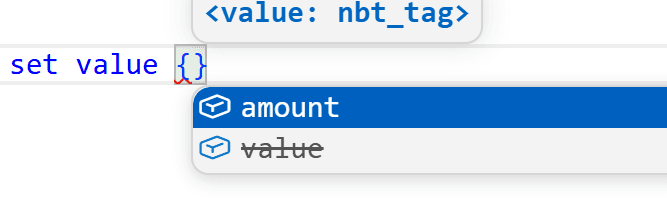
此外还可以注释是在哪个版本弃用的,比如#[deprecated="1.21"]。
命名空间ID
id属性标注值必须是一个命名空间ID的形式,并把没有命名空间的值视为minecraft,且会在NBT检查或路径中禁止省略命名空间:
dispatch minecraft:storage["tut:example"] to struct{
    id: #[id] string,
}
它可以接受一个参数,表示该ID所属的注册表,例如:
dispatch minecraft:storage["tut:example"] to struct{
    function: #[id=function] string,
    item: #[id=item] string,
}
这时大憨批就会提示该命名空间下已经存在的注册表项: 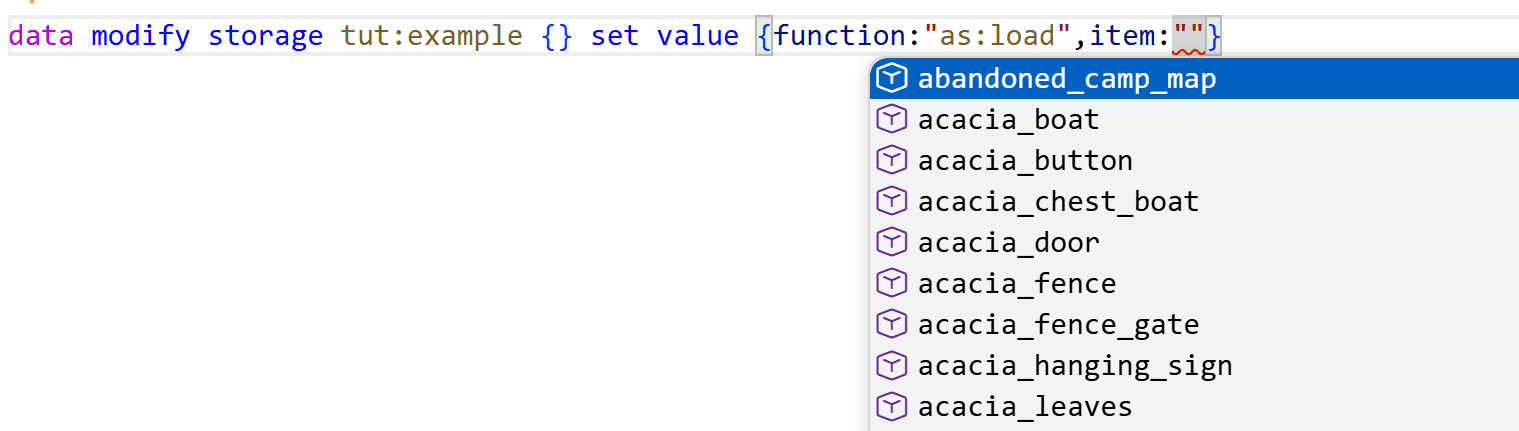 而且Ctrl+点击可以跳转到对应的定义项。
但实际上它还可以接受更多参数!包括:
registry:该ID所属的注册表,也就是上面只提供一个参数时提供的对象。tags:是否允许标签,可以是allowed(可以),required(必须是标签),或implicit(必须是标签且不加#)。如果不提供这个属性那就是不允许标签。path:定义路径从哪个文件夹开始算。prefix:允许在ID之前添加提供的字符。exclude:列表。不允许使用的ID。definition:可以是true或false(默认)。如果提供的ID不存在,是否定义这个ID。
示例:
dispatch minecraft:storage["tut:example"] to struct{
    /// 函数,可以是函数标签
    function: #[id(registry="function", tags="allowed")] string,
    /// 物品使用的模型,从item路径开始算
    model: #[id(registry="model", path="item/")] string,
    /// 物品,但不可以是air
    item: #[id(registry="item", exclude=["air"])] string,
    /// 物品组件,且可以写成`!<物品组件>`的形式
    components: #[id(registry="data_component_type", prefix="!")] string
}让我们着重研究一下definition。
先试着给原版的注册表加definition:
dispatch minecraft:storage["tut:example"] to struct{
    /// 定义更多物品
    items: [#[id(registry="item",definition=true)] string],
}这里我们定义了items键为字符串列表,且可以作为新ID的定义,可以发现写在这个列表中的ID出现在了give命令的列表中: 
但不止!我们可以定义自己的注册表并往里面加入ID:
dispatch minecraft:storage["tut:example"] to struct{
    /// 定义我们的技能
    skills: [#[id(registry="dahesor:skill",definition=true)] string],
    /// 使用我们的技能
    using: #[id="dahesor:skill"] string
}
可以看到我们自己的注册表内容被提示了: 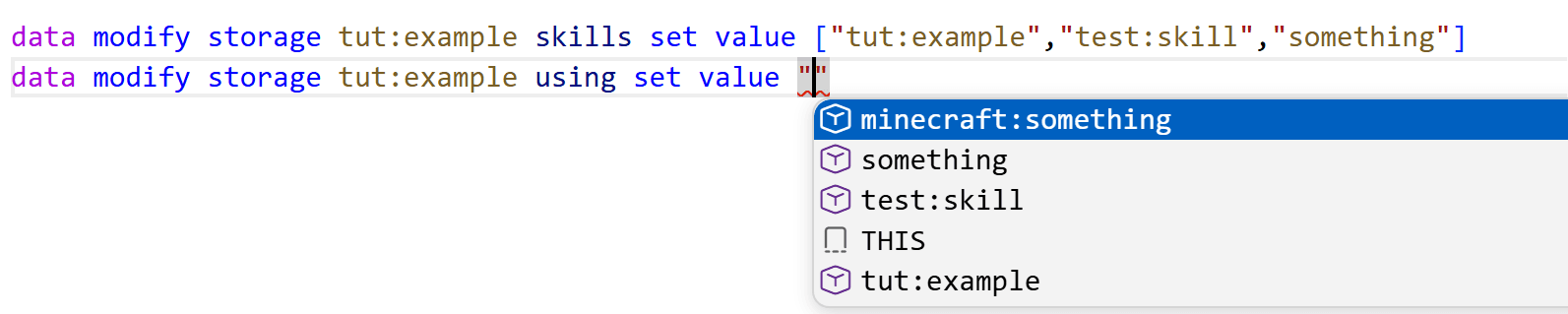
注意something由于没有命名空间,所以被当成了minecraft。因此为了避免可能出现的漏洞,如果读者想用这个技巧,应该总是定义带命名空间的ID。
正则
regex_pattern属性要求值必须是一个正则表达式。match_regex属性要求值必须符合提供的正则表达式。
注意这两个东西不一样。
dispatch minecraft:storage["tut:example"] to struct{
    regex?: #[regex_pattern] string,
    digits?: #[match_regex="[0-9]+"] string,
}
版本标注
since和until属性对键施加,规定该键在哪个版本之后或之前才存在,必须提供一个版本作为参数:
dispatch minecraft:storage["tut:example"] to struct{
    // 26.3之后,使用type
    #[since="26.3"]
    type?: #[id="loot_condition_type"] string,
    // 26.3之前,使用condition
    #[until="26.3"]
    condition?: #[id="loot_condition_type"] string,
}
SNBT
nbt属性要求值必须是一个字符串形式的SNBT,例如"{id:\"apple\"}"。可以提供参数以规定要符合的数据类型,不过这个参数现在不受支持。nbt_path属性要求值必须是一个NBT路径。然而这个属性也不被支持,暂时用不了。
dispatch minecraft:storage["tut:example"] to struct{
    nbt: #[nbt=NBTData] string,
}

struct NBTData{
    value?: double,
}
默认形式
在一个并集中,如果有一个数据类型有canonical属性,则在尝试检查或读取这个NBT时则总是使用这个数据类型。
可以参考展示实体的渲染变换。尽管我们有3种定义的方式,但游戏总会以四元数复合标签的形式保存。
dispatch minecraft:storage["tut:example"] to struct{
    color?: (
        #[canonical] #[color="composite_rgb"] int |
        #[color="dec_rgb"] [float] @ 3 |
        #[color="hex_rgb"] string |
    )
}
其他
translation_key属性要求值必须是一个翻译键。和命名空间类似,也可以使用definition以在不存在时定义翻译键。pack_format属性要求值必须是一个pack.mcmeta中的版本号。time_pattern属性要求值必须是一个时间格式,比如yyyy-MM-dd或HH:mm:ss。integer属性施加给string时,要求这个字符串必须是一个整数,且可以提供min和max属性规定范围。text_component属性要求string必须是字符串保存的JSON文本组件,也就是1.21.4之前的老格式。criterion可以定义和使用进度准则,基本用不到,不多赘述。
调度器
调度器可以根据不同的值使用不同的数据结构。参考文本组件的click_event,在action是run_command时需要提供command,而是open_url则需要提供url。
写一下上述的结构:
dispatch minecraft:storage["tut:example"] to struct{
    action: ("run_command"|"open_url"),
    ...dahesor:action_type[[action]]
}

dispatch dahesor:action_type[run_command] to struct{
    command: #[command] string
}

dispatch dahesor:action_type[open_url] to struct{
    url: #[url] string
}我们定义了一个新的调度器,ID是dahesor:action_type。它会读取action的值作为调度键,根据不同的值使用不同的内容。
注意三个点...。前面说过,是直接使用键值对。所以当然也可以写:
dispatch minecraft:storage["tut:example"] to struct{
    action: ("run_command"|"open_url"),
    data: dahesor:action_type[[action]]
}这样就成了{action:"run_command",data:{command:"say 1"}}的格式。
注意[action]相当于上面说过的动态键名。如果不加[],那么就会根据写死的值查阅调度器:
dispatch minecraft:storage["tut:example"] to struct{
    action: ("run_command"|"open_url"),
    ...dahesor:action_type[run_command]
}

dispatch dahesor:action_type[run_command] to struct{
    command: #[command] string
}

dispatch dahesor:action_type[open_url] to struct{
    url: #[url] string
}
这样无论如何都会提示command。
内置和提供的调度器
现在是时候看看我们写了好久的dispatch minecraft:storage["tut:example"]了,没错,这相当于大憨批留下来的接口,按照storage的ID调度到不同的数据类型。
可以发现,调度器一旦定义就是全局的,不像是struct之类,如果来自其他文件就必须先use。
一些其他的接口:
mcdoc:custom_data:这是预留的custom_data中的调度器,可以定义物品组件custom_data或实体data数据下的内容,比如:
dispatch mcdoc:custom_data["flag"] to boolean
dispatch mcdoc:custom_data["info"] to struct {
    score?: int,
    value?: double,
}
可以看到补全: 
minecraft:resource:相当于是各种JSON定义的根调度器,比如dispatch minecraft:resource[predicate]或dispatch minecraft:resource[recipe]。我们暂时略过不说。
调度struct
除了调度器可以这样调度,其实struct也可以。类似这样:
dispatch minecraft:storage["tut:example"] to struct{
    action: ("run_command"|"open_url"),
    ...ActionType[[action]]
}

struct ActionType{
    run_command?: struct{
        command: #[command] string
    },
    open_url?: struct{
        url: #[url] string
    },
}
对比调度器,它不是全局的,且没有那么容易管理。
并且,一旦写死其他人也无法加入新的调度选项(在支持inject之前),例如,只要写
dispatch minecraft:click_event[my] to struct{
    data: int,
}就可以给文本的click_event加一个调度器(因为vanilla-mcdoc内部定义了这个调度器),而使用struct则做不到。
回落情况
%fallback调度键无需定义,会被mcdoc自动生成,是所有情况的并集:
dispatch minecraft:storage["tut:example"] to struct{
    events?: minecraft:click_event[%fallback]
}
可以看到所有的情况都被提示了: 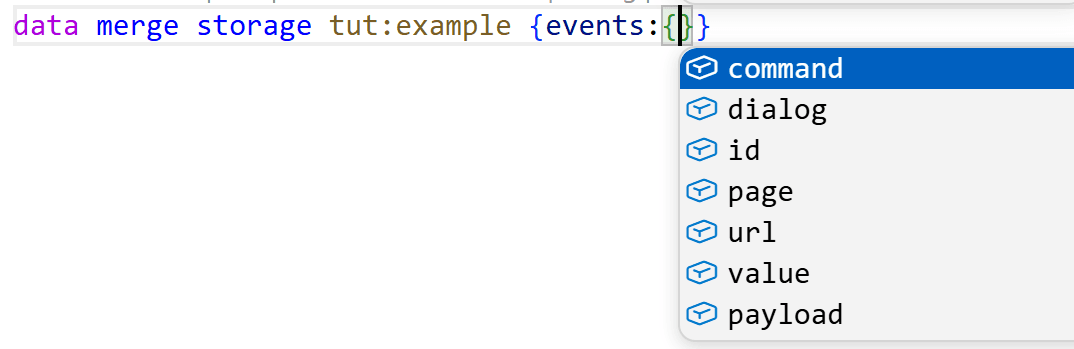
空调度键
%none是没有给调度器提供ID的情况:
dispatch minecraft:storage["tut:example"] to struct{
    action: string,
    ...dahesor:action_type[[action]]
}

dispatch dahesor:action_type[%none] to struct{
    data: any,
}

dispatch dahesor:action_type[run_command] to struct{command: #[command] string}
dispatch dahesor:action_type[open_url] to struct{url: #[url] string}在我们不写action的时候就会提示data,但一旦提供了action就不再会提示data,即使不是run_command或open_url之一。
未知调度键
如果提供了没有定义的调度键,就会使用%unknown定义的情况。
dispatch minecraft:storage["tut:example"] to struct{
    action: string,
    ...dahesor:action_type[[action]]
}

dispatch dahesor:action_type[%unknown] to struct{
    data: any,
}

dispatch dahesor:action_type[run_command] to struct{command: #[command] string}
dispatch dahesor:action_type[open_url] to struct{url: #[url] string}如果action不是run_command或open_url之一就会提示data。
如果没有定义%none,那么在不提供action时也会提示data,因为这时%none这个调度键没有被定义,所以也会使用%unknown。
动态键名调度键
可以使用%key表示使用该键值对的键名作为调度键,比如:
dispatch minecraft:storage["tut:example"] to struct{
    [string]: dahesor:action_type[[%key]]
}

dispatch dahesor:action_type[run_command] to struct{command: #[command] string}
dispatch dahesor:action_type[open_url] to struct{url: #[url] string}
这里我们的键名是run_command,所以就会使用它作为调度键: 
调度器属性
上面说的属性中,还有一个是dispatcher_key。它需要一个参数提供调度器的ID,以要求值必须是该调度器的一个键。
我们可以通过该属性完善动态键名调度键章节中的示例:
dispatch minecraft:storage["tut:example"] to struct{
    [#[dispatcher_key="dahesor:action_type"] string]: dahesor:action_type[[%key]]
}

dispatch dahesor:action_type[run_command] to struct{command: #[command] string}
dispatch dahesor:action_type[open_url] to struct{url: #[url] string}这样即使键名是动态的[string],大憨批也会提示可能的run_command或open_url。
使用子节点
和NBT路径类似,可以使用.来进入子节点:
dispatch minecraft:storage["tut:example"] to struct{
    content: struct{
        action: ("run_command"|"open_url"),
    },
    ...dahesor:action_type[[content.action]]
}

dispatch dahesor:action_type[run_command] to struct{command: #[command] string}
dispatch dahesor:action_type[open_url] to struct{url: #[url] string}
使用父节点
使用%parent来向上移动一层:
dispatch minecraft:storage["tut:example"] to struct{
    action: ("run_command"|"open_url"),
    content: struct{
        ...dahesor:action_type[[%parent.action]]
    }
}

dispatch dahesor:action_type[run_command] to struct{command: #[command] string}
dispatch dahesor:action_type[open_url] to struct{url: #[url] string}
也可以套娃:
dispatch minecraft:storage["tut:example"] to struct{
    [string]: struct{
        content: struct{
            ...dahesor:action_type[[%parent.%parent.%key]]
        }
    }
}

dispatch dahesor:action_type[run_command] to struct{command: #[command] string}
dispatch dahesor:action_type[open_url] to struct{url: #[url] string}
连续调度
调度器可以深入多层数据结构:
dispatch minecraft:storage["tut:example"] to struct{
    action: "open_url",
    type: ("url"|"file"),
    ...dahesor:action_type[[action]][[type]]
}

dispatch dahesor:action_type[open_url] to struct{
    url?: struct{
        url: #[url] string
    },
    file?: struct{
        path: string
    }
}根据action和type的不同会选中不同的情况。
并列调度
如果有多个调度键的结果一样,可以用,隔开来写在一起:
dispatch minecraft:storage["tut:example"] to struct{
    action: ("run_command"|"open_url"),
    ...dahesor:action_type[[action]]
}

dispatch dahesor:action_type[open_url, run_command] to struct{
    data?: string
}这里run_command和open_url情况相同。
注入
标准中规定了inject关键字可以向struct或enum中注入新的键值对,但大憨批暂时并不支持这么使用,因此这里不探讨。
常用引用
use ::java::util::text::Text:1.21.5+的文本组件use ::java::world::component::CustomData:物品的custom_data和实体的datause ::java::world::item::ItemStack:物品堆use ::java::util::slot::SlottedItem:带槽位的物品堆,注意这是泛型use ::java::data::dialog::Dialog:对话框结构use ::java::world::entity::mob::EntityEquipment:生物的equipment
这里只列举了寥寥几个,有需要应该自行在vanilla-mcdoc中翻找。
错误排查
如果大憨批的符号补全出现异常,可以尝试让其(按下F1,或Ctrl+P后输入>)执行>Spyglass: Reset Prolect Cache,再重启VS Code。
有时,这也无法解决全部问题。此时请你执行>Spyglass: Reset Prolect Cache,这会打开缓存文件夹。这时关掉VS Code,删掉弹出的文件夹中的symbols文件夹,再重启VS Code即可。
目前,mcdoc的路径有些问题。正常来说,在根目录下的mcdoc文件夹会被当成跟目录。也就是说mcdoc/dir/this.mcdoc的路径理应是::dir::this。然而,在你进行了上述符号清理后,mcdoc有可能会变成路径的一部分,也就是::mcdoc::dir::this。在该漏洞修复之前,出现这种情况只需要更改所有引用路径即可。
参考
如果你感兴趣,可以仔细阅读: